Home

Case study · Industrial OEM, B2B SaaS

Entytle

Entytle helps industrial OEMs earn from the machines they have already sold: where each one is, when it needs service, and what that service is worth. I was its only designer for two years, across four products and the dashboard over them.

Role
The only designer, for just over two years. I designed Quote Agent, Asset Lifecycle Management and Installed Base Health Check as products, and came to Installed Base Intelligence a module at a time.
Team
I was the only designer, alongside three product managers. Entytle is a US company with its team in Pune, and I worked with them remotely.
When
2022–2024, at Entytle

Read as MarkdownUpdated

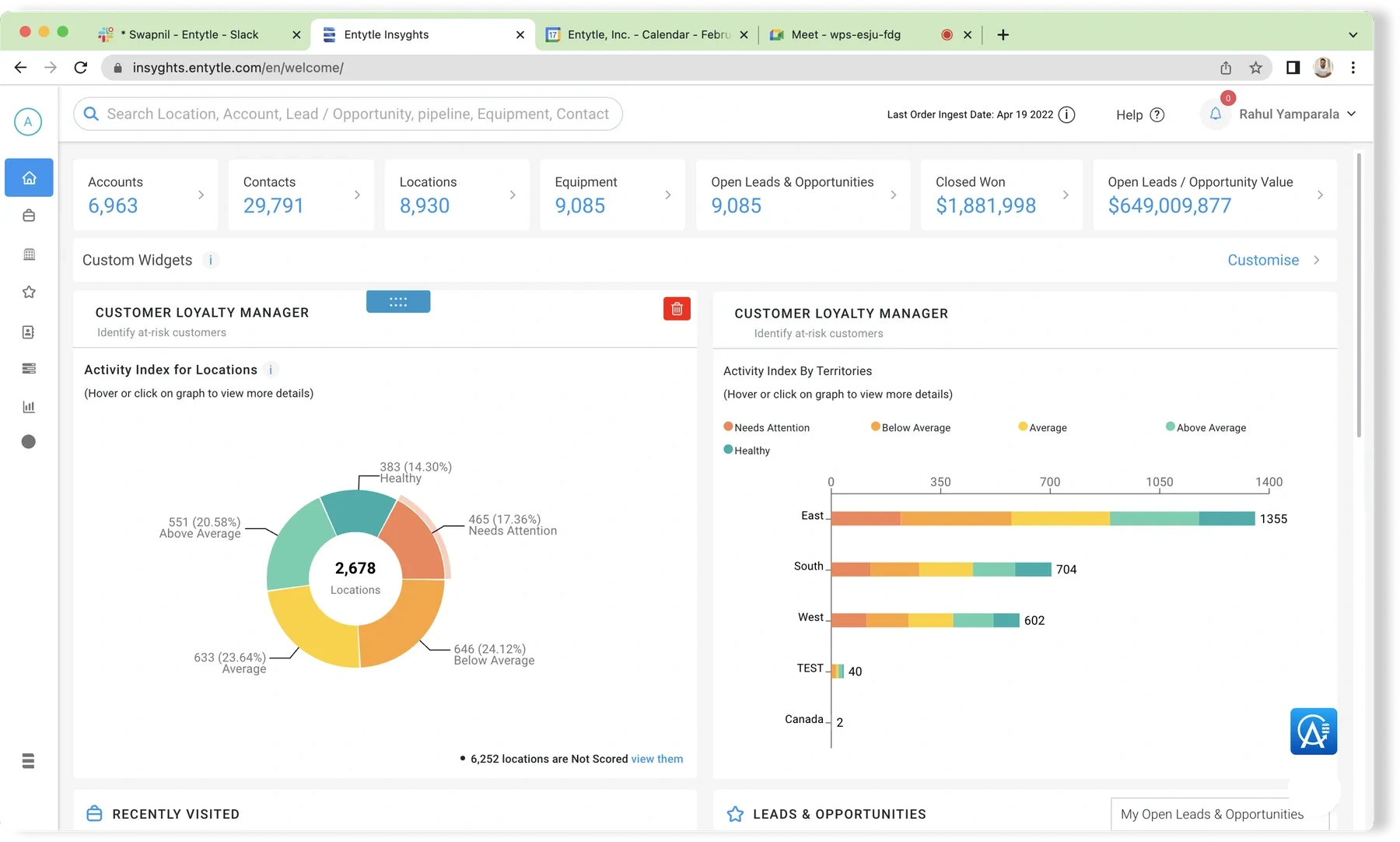
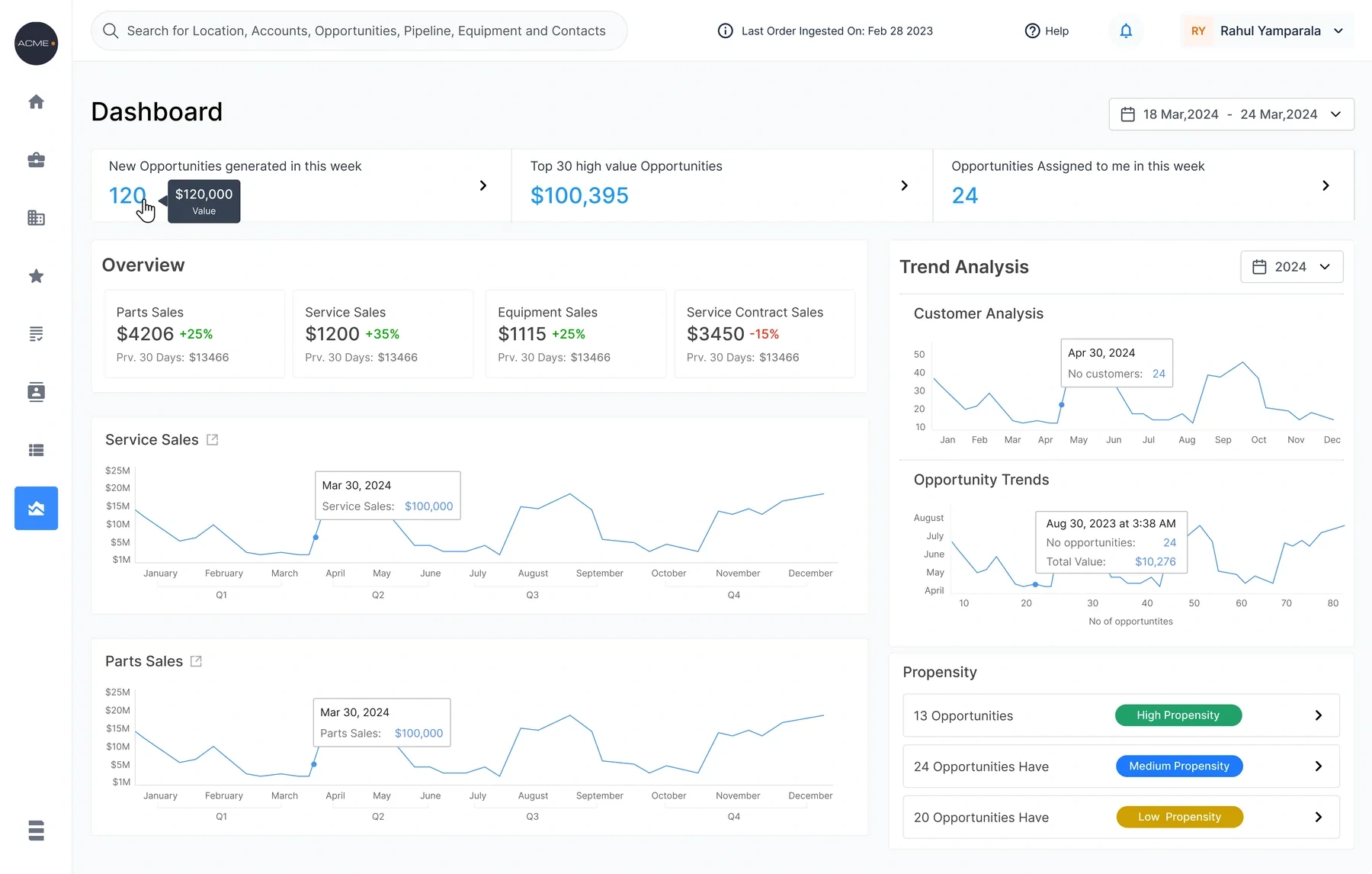
The Insyghts dashboard at rest, showing a territory and date filter above Sales Overview cards, an Opportunities Overview with propensity groupings, and opportunity trend and stage distribution charts
The Executive Dashboard at rest. One territory and one date range scope everything, so a regional lead and a global one read the same layout about a different book of business.

The products

Four products and the dashboard over them. Quote Agent, Asset Lifecycle Management, Health Check and the dashboard shipped; Newton, the AI side panel, was still in development.

  • Quote AgentWebTeams answering customers' quote requestsReads a customer's email, drafts the quote, and leaves the decision to a person.
  • Asset Lifecycle ManagementWebTeams that service the installed baseEach machine's stage, the service it is due, and what that service is worth.
  • Installed Base Health CheckWeb and mobileInspectors at the machine, and the desk that schedules themAn inspection as a checklist: written once, scheduled against one serial, answered on a phone.
  • Installed Base IntelligenceWeb and mobileAftermarket sales teamsAlready shipping when I joined. I designed four modules: contacts, pricing, downloads and automated email.
  • Executive DashboardWebRegional and global leadsEvery summary line is a filter you can act on.
  • NewtonWebAnyone in the productAn AI side panel that presents an opportunity as named fields and says it can be wrong.In development, not shipped
One machine's life

Entytle's promise to an OEM fits in one line: know where every machine you sold is, when it needs service, and what that service is worth.

Its customers make industrial equipment such as chillers, pumps and conveyors, and sell it to big manufacturing businesses. The sale happens once. The parts, service and renewals after it are the business.

Turn the dial to follow one machine through its life. At each stage a different person acts, in a different Entytle product.

  • Asset Lifecycle Management
  • Installed Base Health Check
  • Quote Agent
Building the plant model

Turn the dial to follow the chiller. Tap or hover a part of the plant.

A model drawn for this case study, not an Entytle screen. The lit person acts at that stage, in the product named above the model.

Stage 1: Installed

Who acts
The service team
In Entytle
Asset Lifecycle Management

The chiller joins the customer's installed base: where it is, its serial, and the manufacturer's service plan, as data instead of a PDF manual.
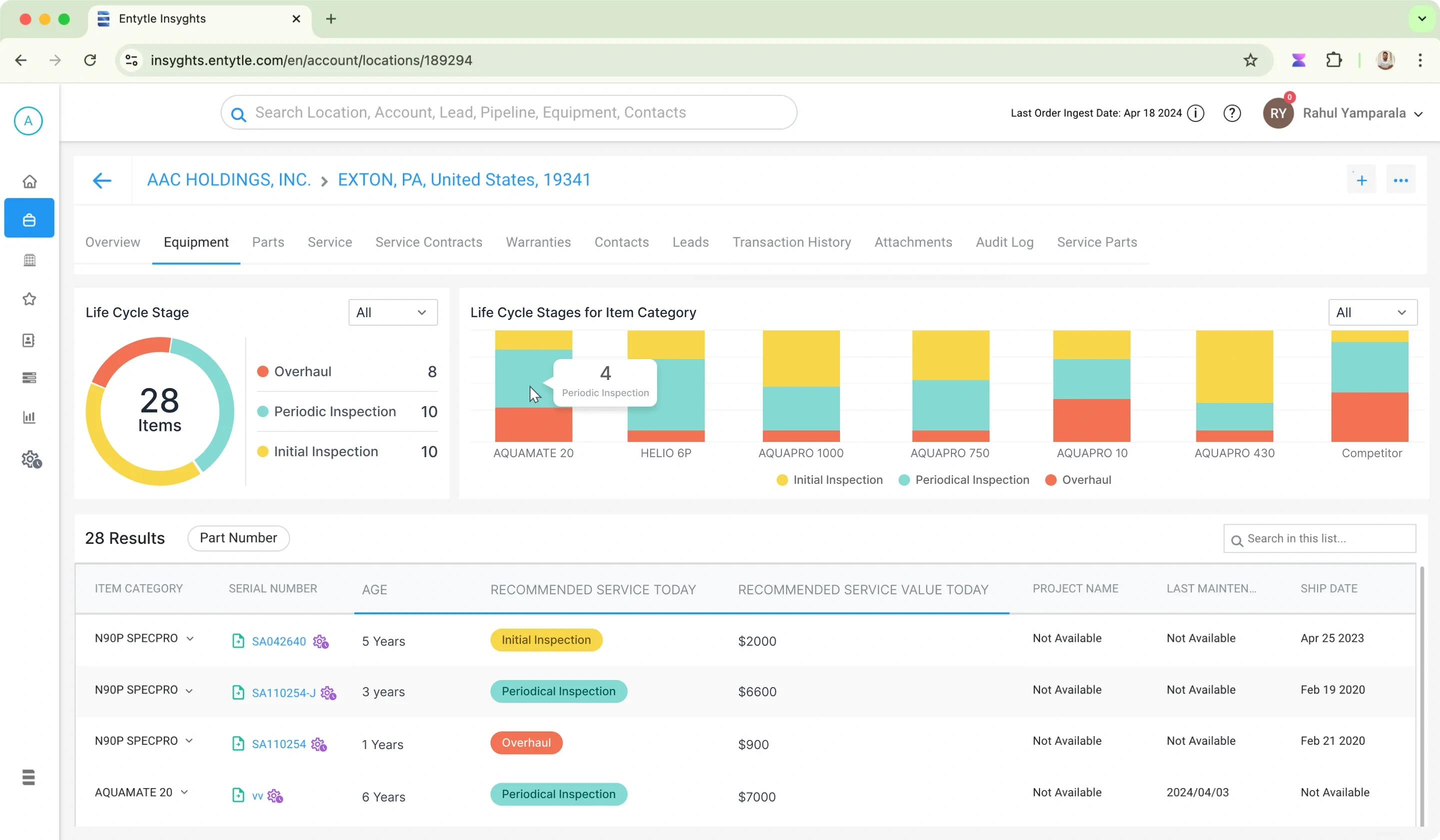
The Equipment tab of a customer location in Entytle Insyghts: a Life Cycle Stage donut counting 28 items across Overhaul, Periodic Inspection and Initial Inspection, a stacked bar chart of those stages per equipment model including a Competitor column, and a table of 28 results giving each item its age, the service recommended today, and what that service is worth
Every machine at one location, with its stage, the service due and what it is worth.
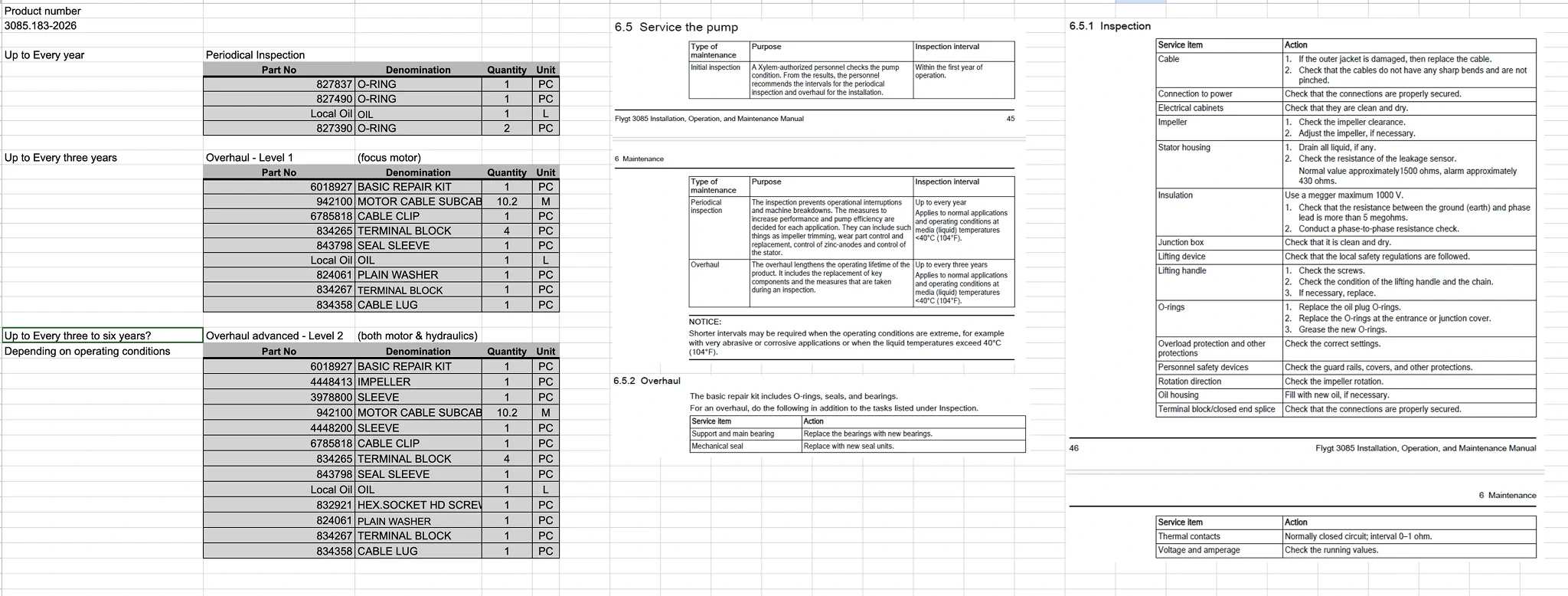
The workflow before the product: a spreadsheet of service kits by interval, listing part numbers, denominations and quantities for periodical inspection and two levels of overhaul, beside scanned pages of the pump manufacturer's installation and maintenance manual that the intervals were copied from
Before Entytle: one pump's service plan, typed by hand from the manufacturer's manual into a spreadsheet. The interval reads "Up to Every three to six years?", question mark included.

From an email to a quote

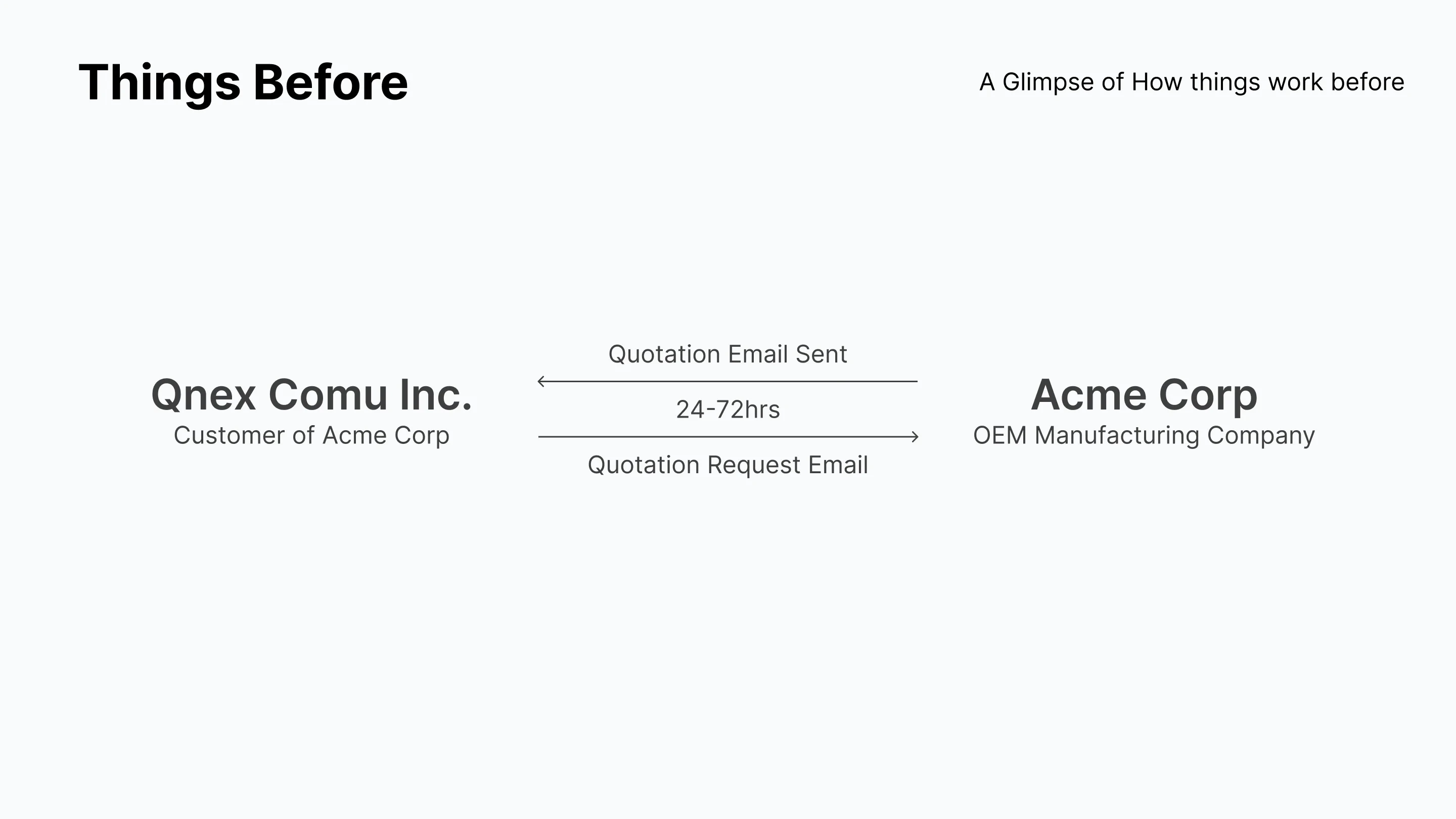
A customer emails a few part numbers and waits one to three days for a price. Quote Agent reads the email and drafts the quote; a person checks it and sends it.

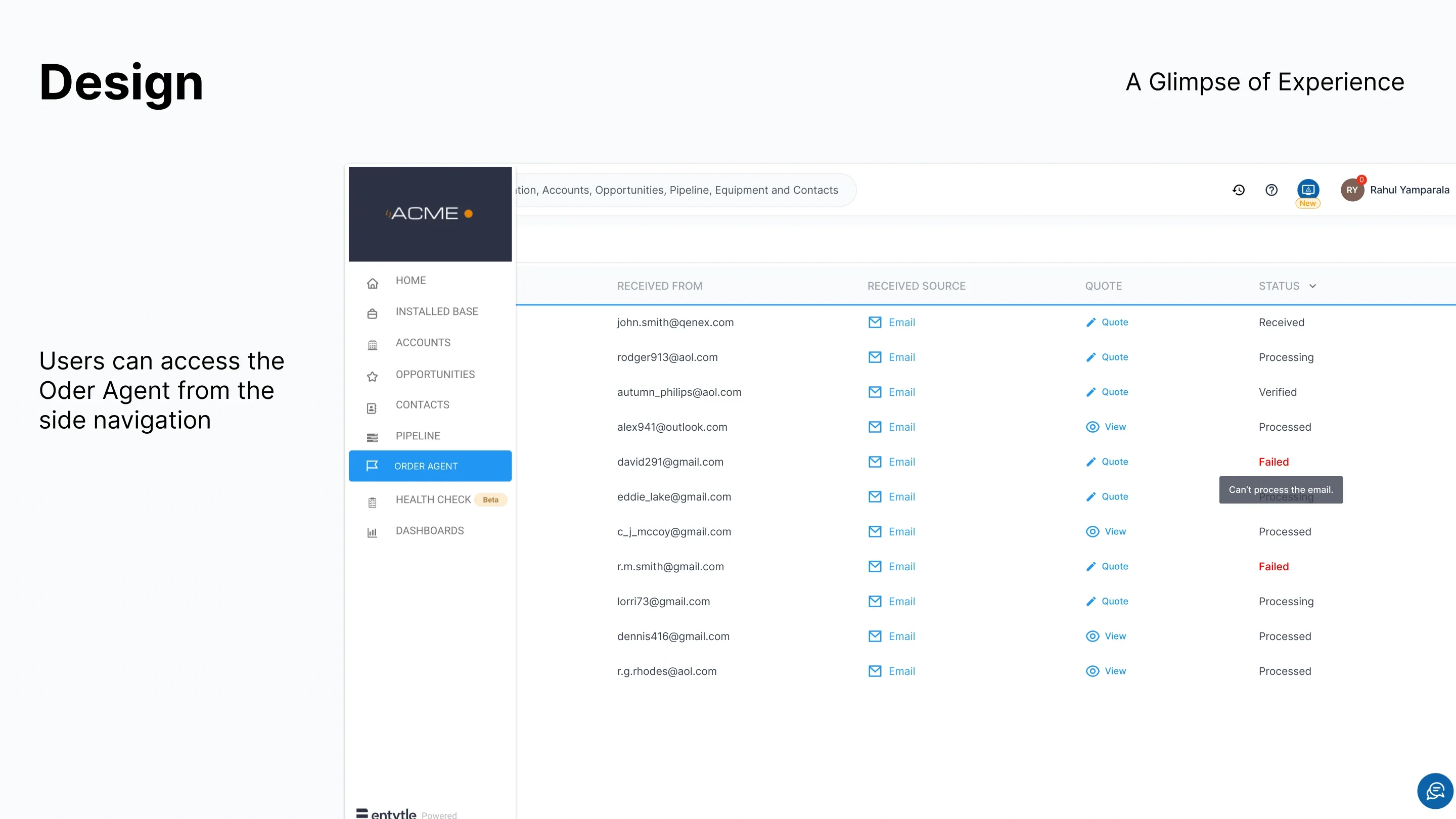
Every request lands in a queue with a status, and a failed one says why. The source email stays one click from the quote it produced, so checking the agent means reading what it read.

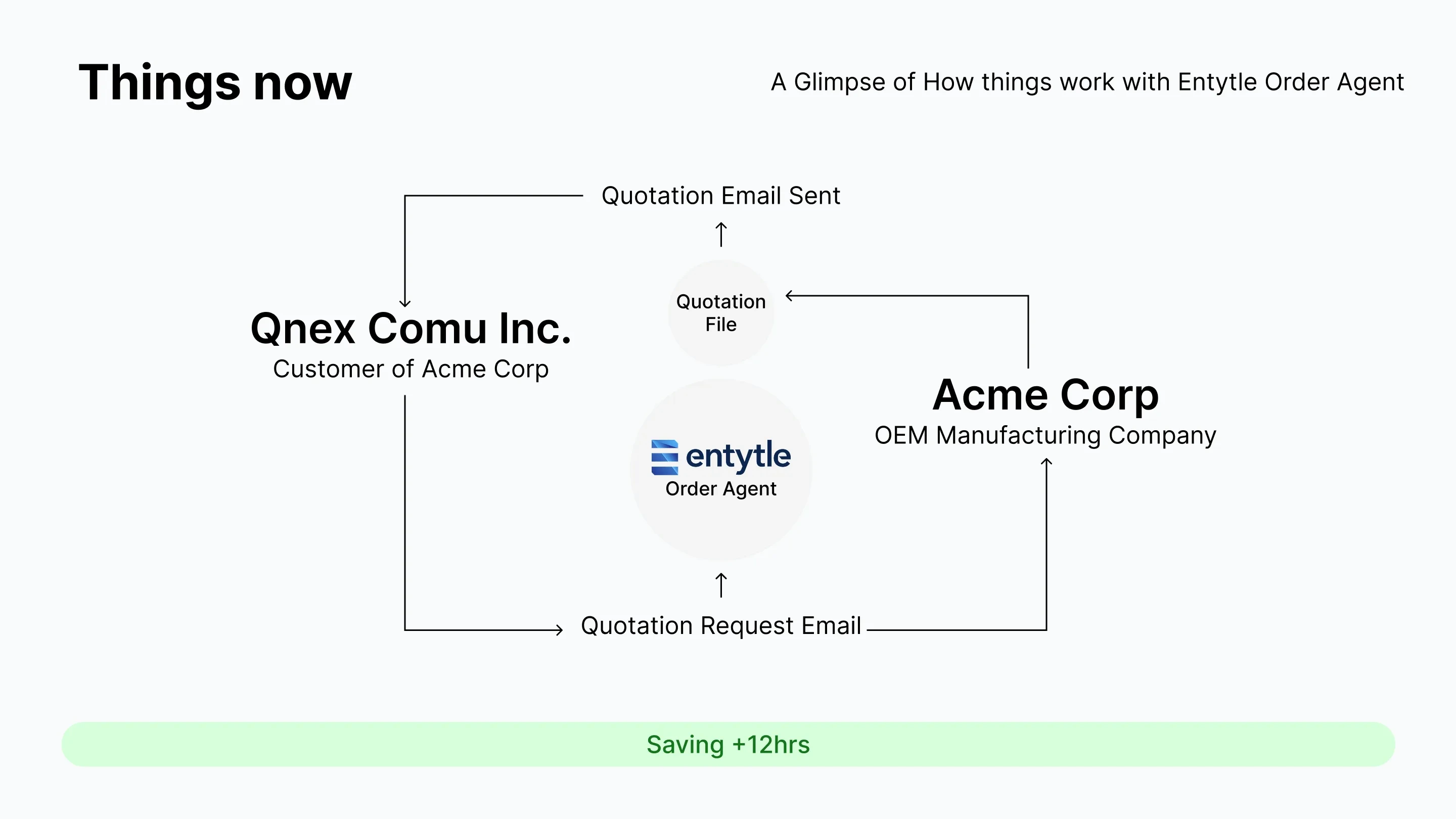
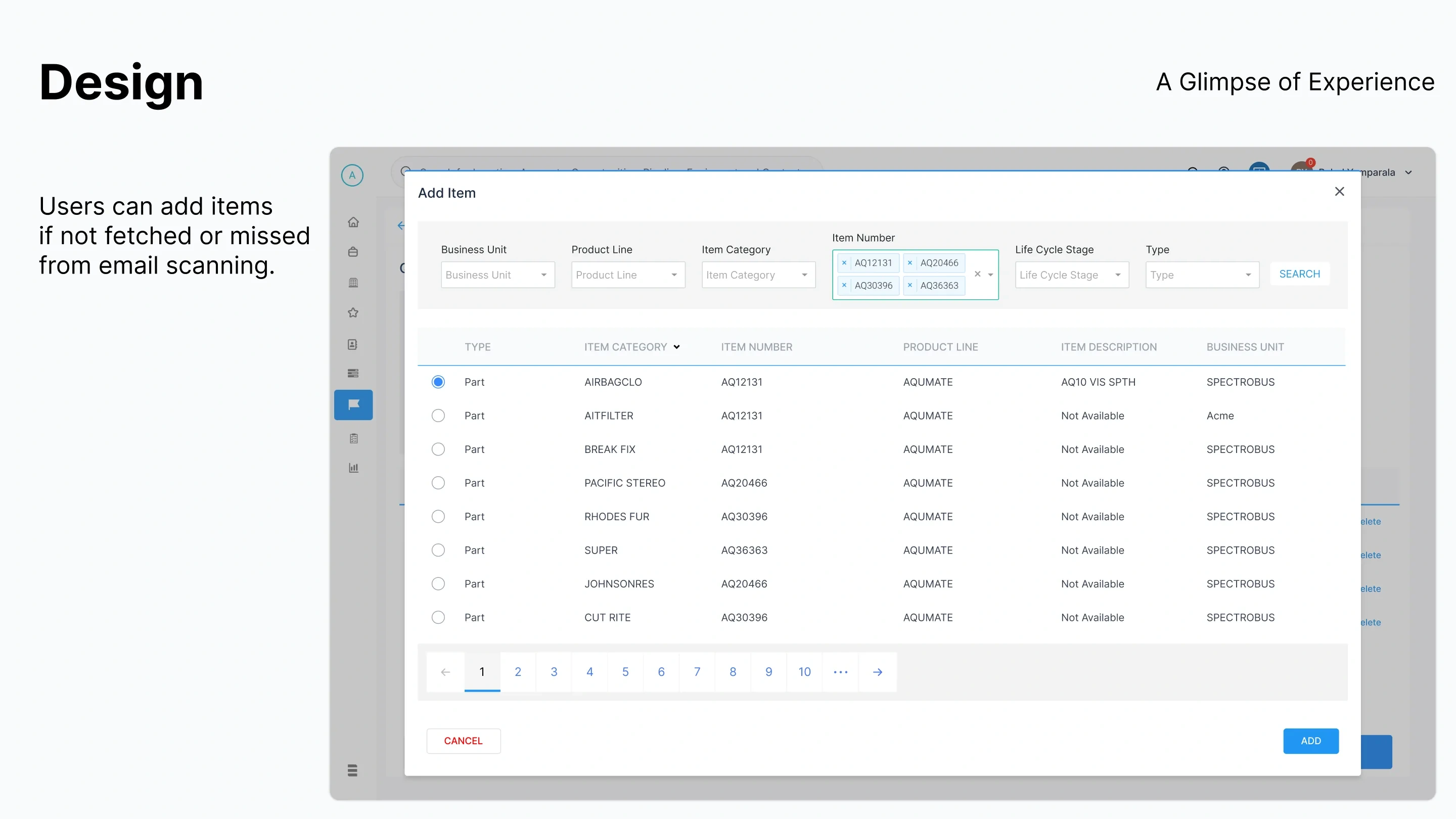
When the scan misses an item, a person adds it from the catalogue, so a bad extraction costs one search, not the whole quote. My deck for it put the time saved at about 12 hours. Entytle's own page breaks one quote down step by step: switch between the two below.

~65 minutes a quote

  1. Reading the requestEmail analysis and system checks~20 min
  2. Routing itMatching it to a salesperson~10 min
  3. Checking the detailsCustomer, transaction history, parts price book and days to order~20 min
  4. Validating the quotePreparing the document~15 min

About 10 hours back each day.

Entytle's own benchmark, from its Quote Agent page: typical figures they observed, not a measurement of mine.
  • A slide titled Things Before, showing a customer company and an OEM manufacturer with a quotation request email going one way and a quotation email coming back, labelled 24 to 72 hours
    Before: one to three days
  • A slide titled Things now, with the same customer and manufacturer but Entytle Order Agent sitting between them producing a quotation file, and a green bar reading Saving plus 12 hours
    With the agent: 12 hours saved
From my deck: the round trip it replaced, and the same loop with the agent in it.
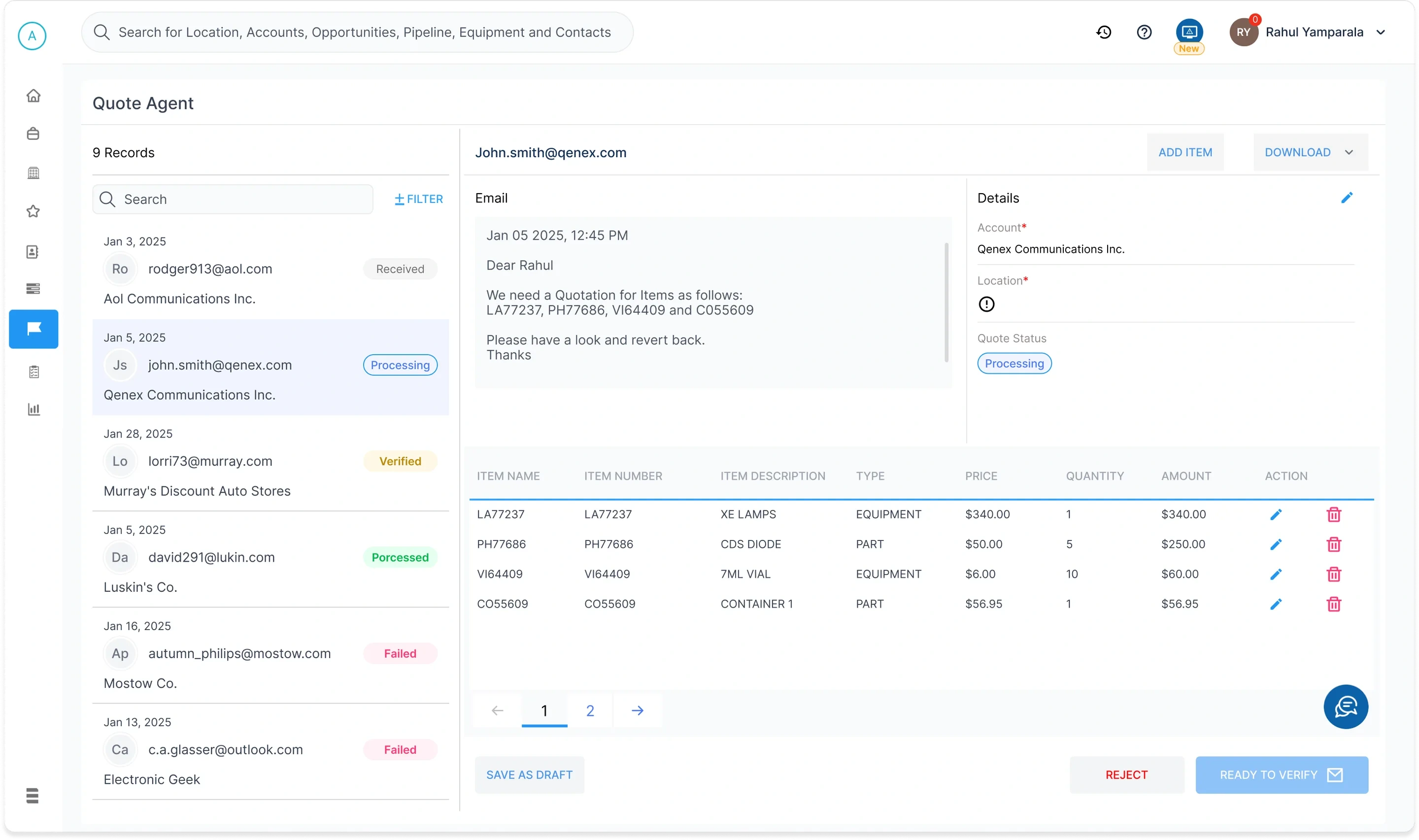
The Quote Agent workspace: a list of nine records with status pills on the left, the customer's email in the middle, a details panel giving account, location and quote status, and a table of the four line items extracted from the email with price, quantity and amount
Where the work happens: the email beside the line items pulled from it. Location carries a warning because the agent could not fill it; the product says what it does not know.
  • A slide showing the Insyghts side navigation with Order Agent selected, and a queue of inbound quotation emails listed by sender, source, quote and status, with a tooltip on a failed row reading Can't process the email
    The queue
  • A slide showing an Add Item modal, searching the catalogue by business unit, product line, item category and item number, with results listed by type, category, number, product line and description
    Added by hand
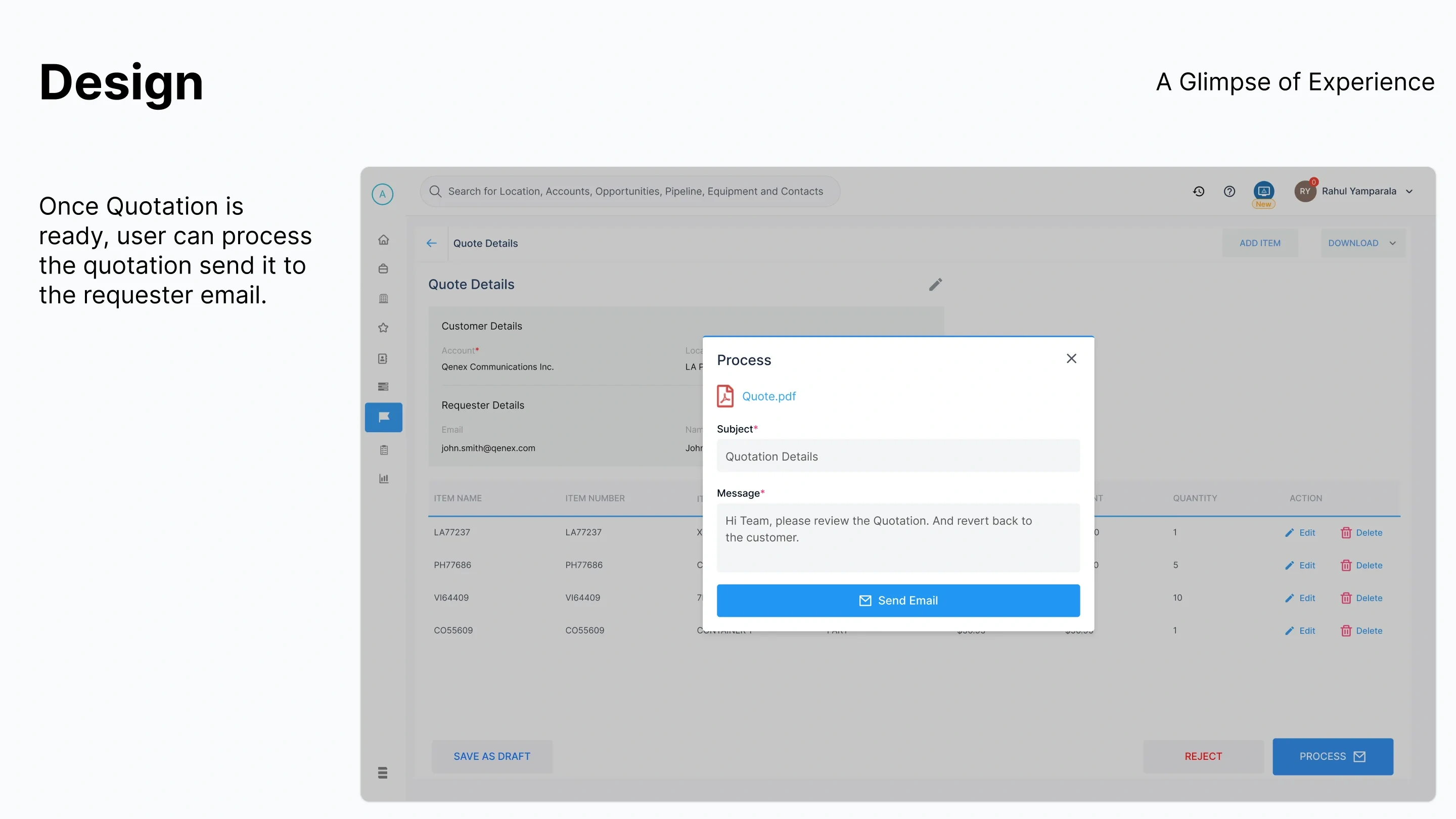
  • A slide showing the Process modal with a generated Quote.pdf attached, a subject line and a message, and a Send Email action returning the quote to the requester
    Sent back
The rest of the loop: a queue whose failed rows explain themselves, the manual override, and the quote sent back to the inbox it came from.

The summary is the query

On the Executive Dashboard a summary line is not a heading. It is a filter you can act on.

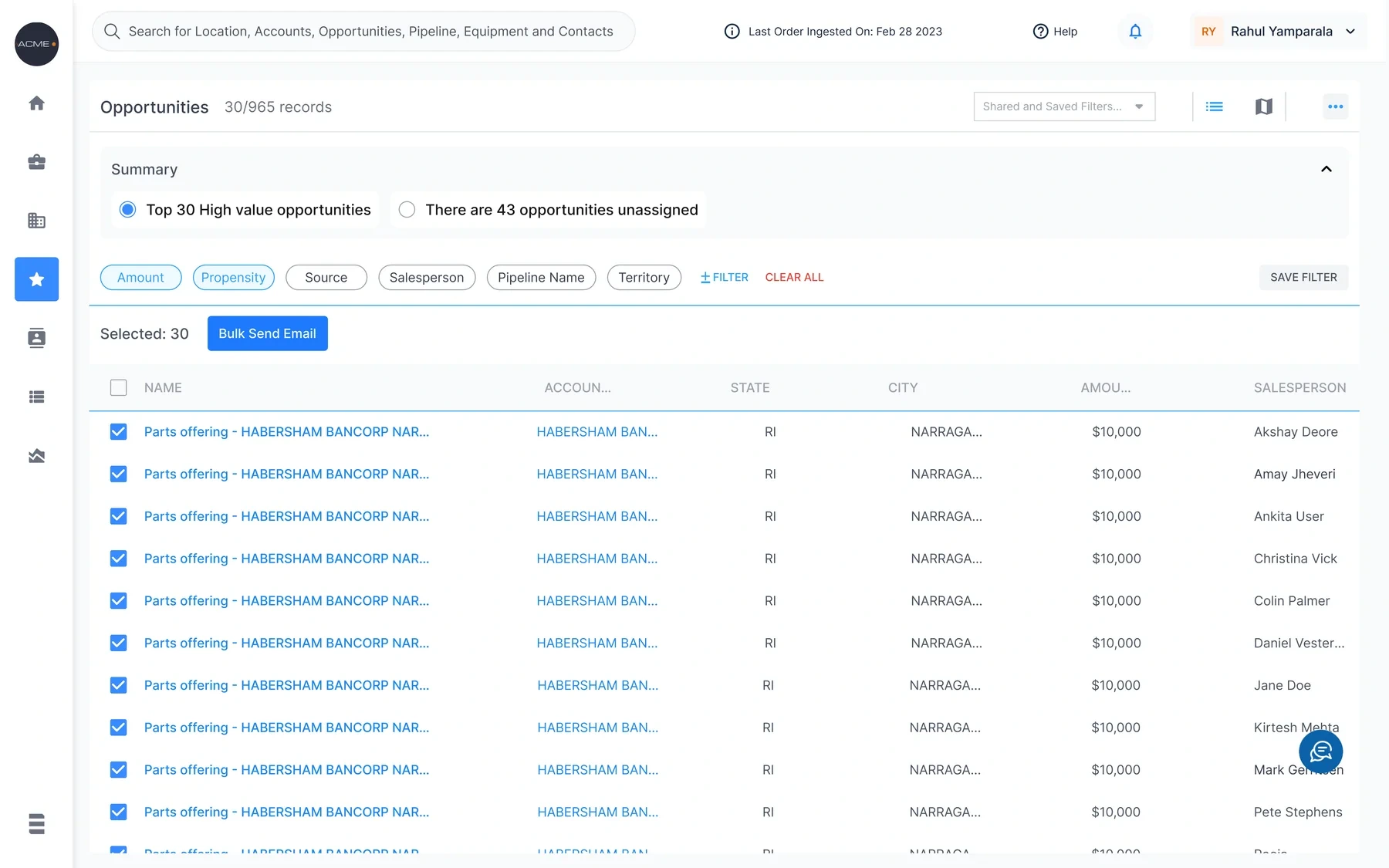
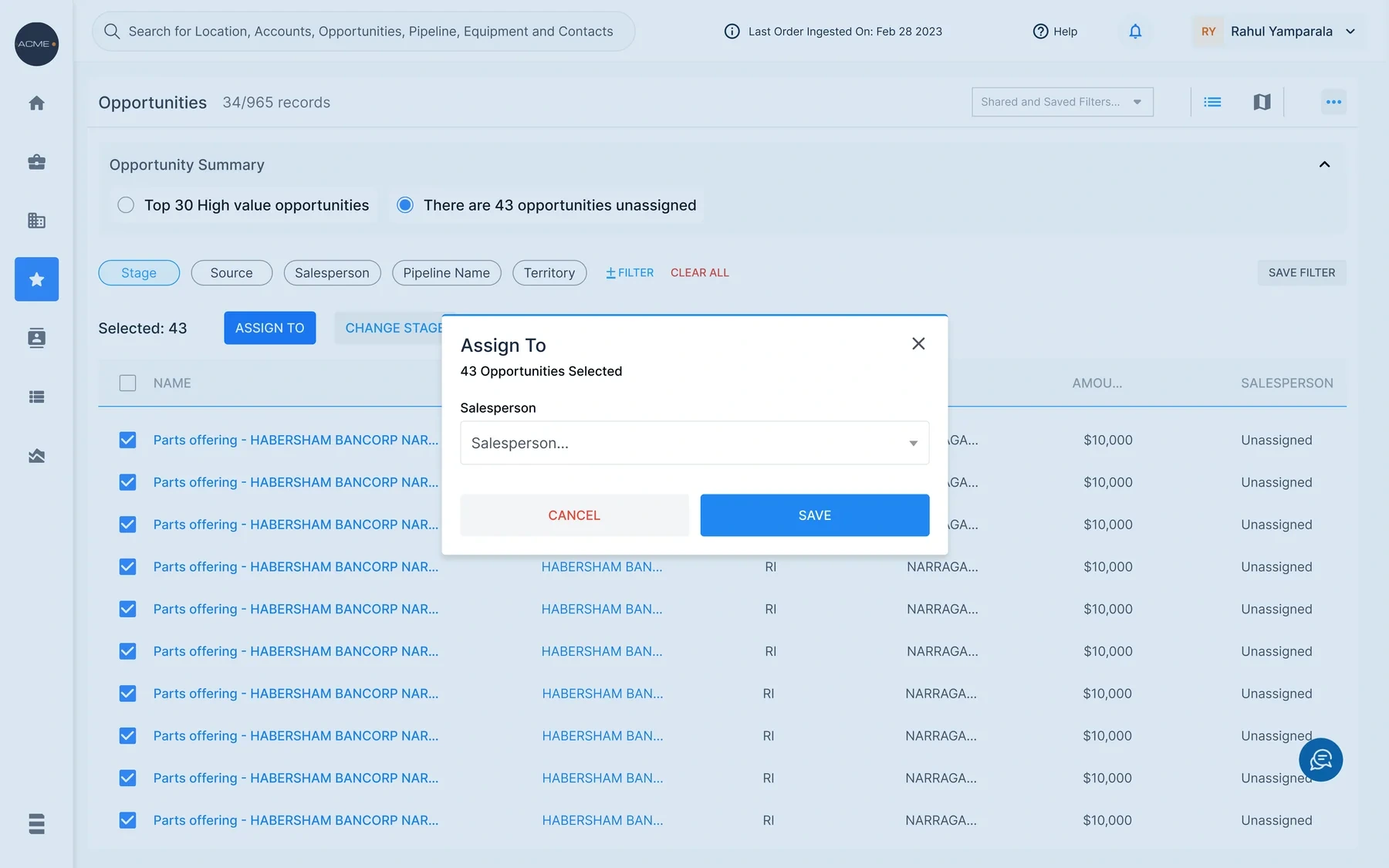
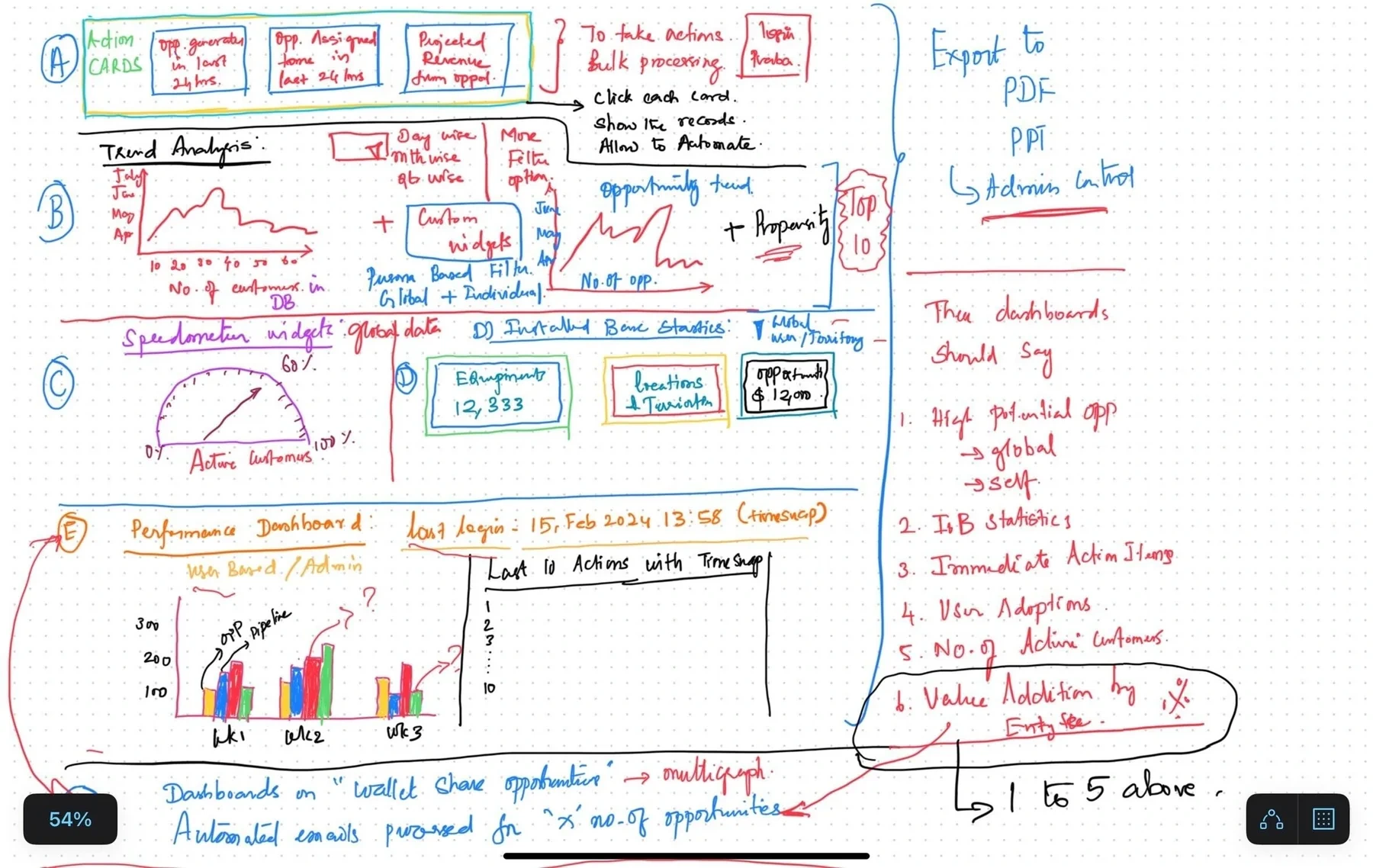
Pick "Top 30 high value opportunities" and the list cuts 965 records to those 30, ready for one bulk email. Pick "43 unassigned" and the actions change to assigning them. The number stops being something you only read.

It took six iterations and an internal hackathon to get there, and the hackathon's directions led to the dashboard that shipped.

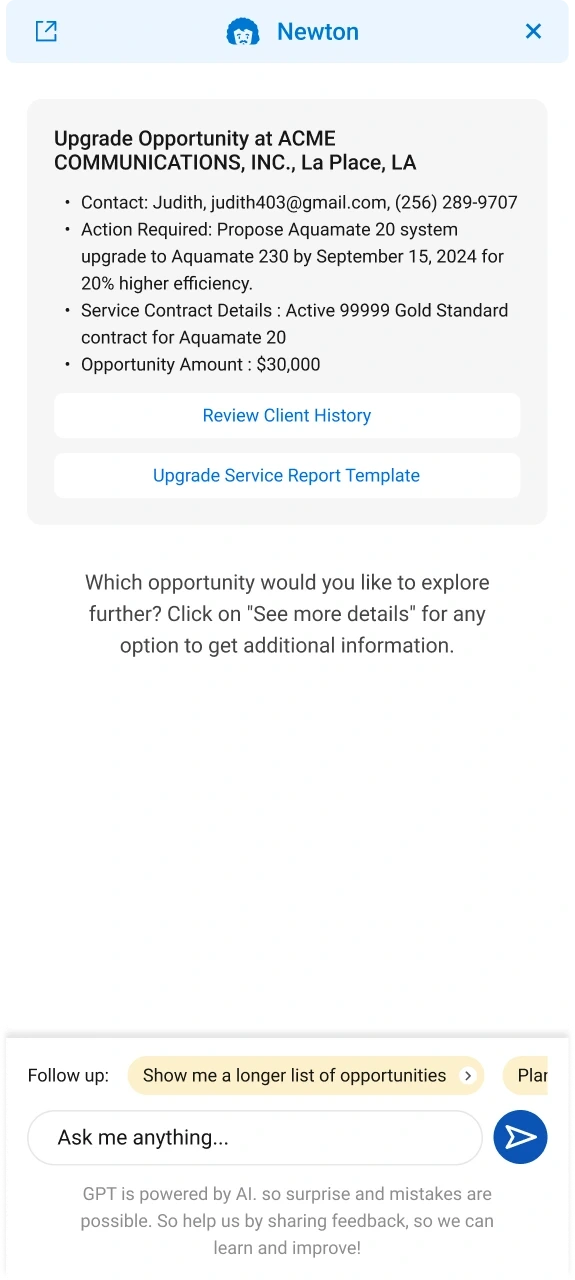
Newton, an AI side panel, presented an opportunity as named fields, with a line saying it can be wrong. It was still in development when I left and did not ship.

  • The Opportunities list filtered to 30 of 965 records, with Top 30 high value opportunities selected as a summary radio, faceted filter chips, all 30 rows checked, and a Bulk Send Email action
    Top 30 high value
  • The same Opportunities list switched to the 43 unassigned summary, all 43 rows checked, with an Assign To modal open on a salesperson picker
    43 unassigned
Two summaries, two lists: the 30 high-value opportunities ready for a bulk email, and the 43 unassigned ones, assigned in one pass.
  • An early dashboard direction from the first iteration
    Iteration 1
  • Further dashboard explorations from the same hackathon
    Hackathon
  • A dashboard direction from the seventh iteration
    Iteration 7
Before the one that shipped: an early direction, a hackathon sheet and a late iteration. The dashboard was argued about, not styled.
Newton, an AI side panel, presenting a thirty thousand dollar upgrade opportunity as named fields for contact, action required, service contract details and amount, with two follow up actions and a notice that mistakes are possible
Newton: an upgrade opportunity as named fields, two next steps, and a note that the model can make mistakes. In development; it did not ship.

From a spreadsheet to a lifecycle

Asset Lifecycle Management says what each machine needs and when. Health Check is where that inspection is written, scheduled and answered at the machine.

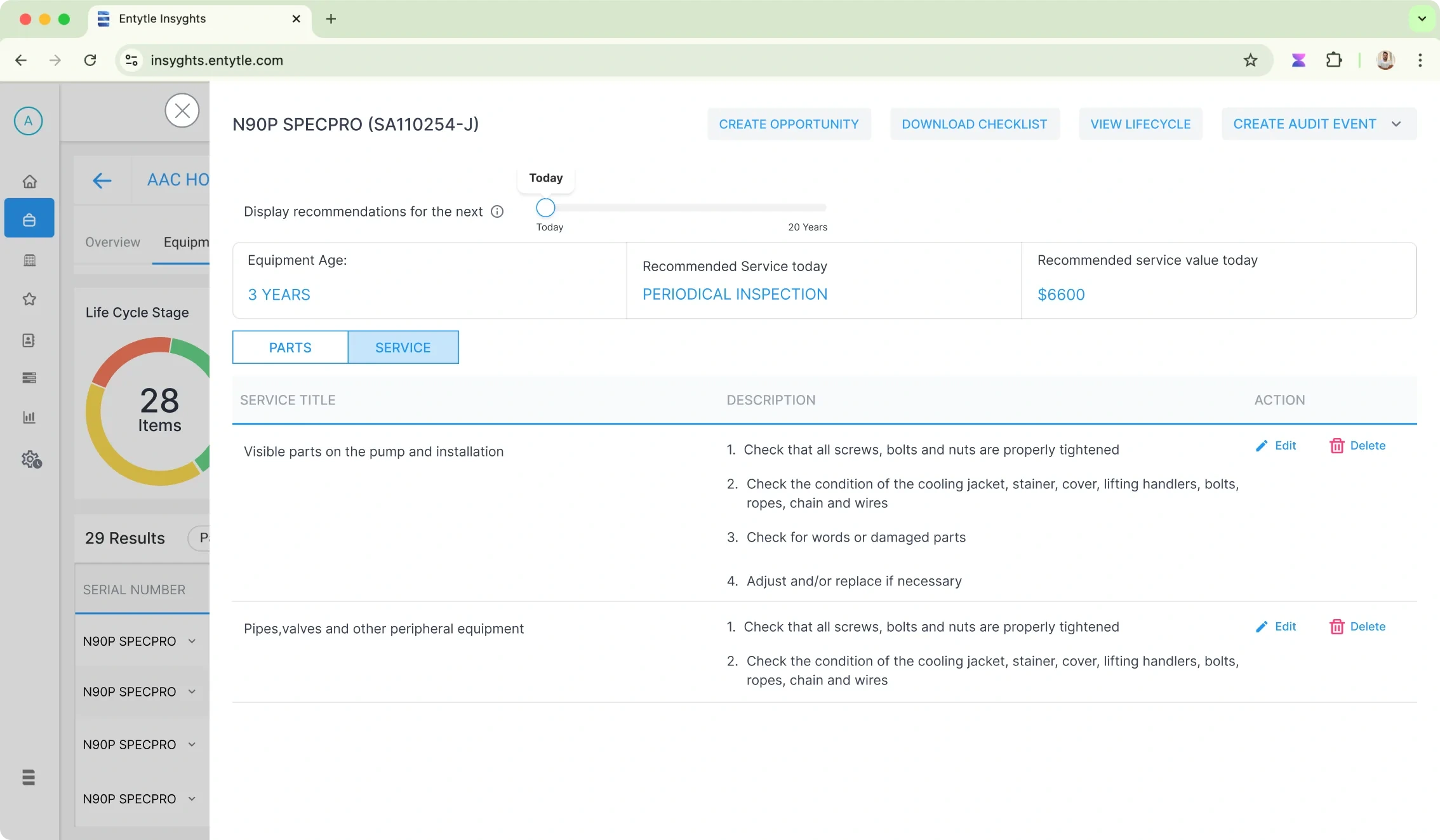
Before, a service plan lived in a spreadsheet copied from a PDF manual. ALM made it data: each machine's stage, the service due today and what it is worth, with a slider that forecasts the next twenty years.

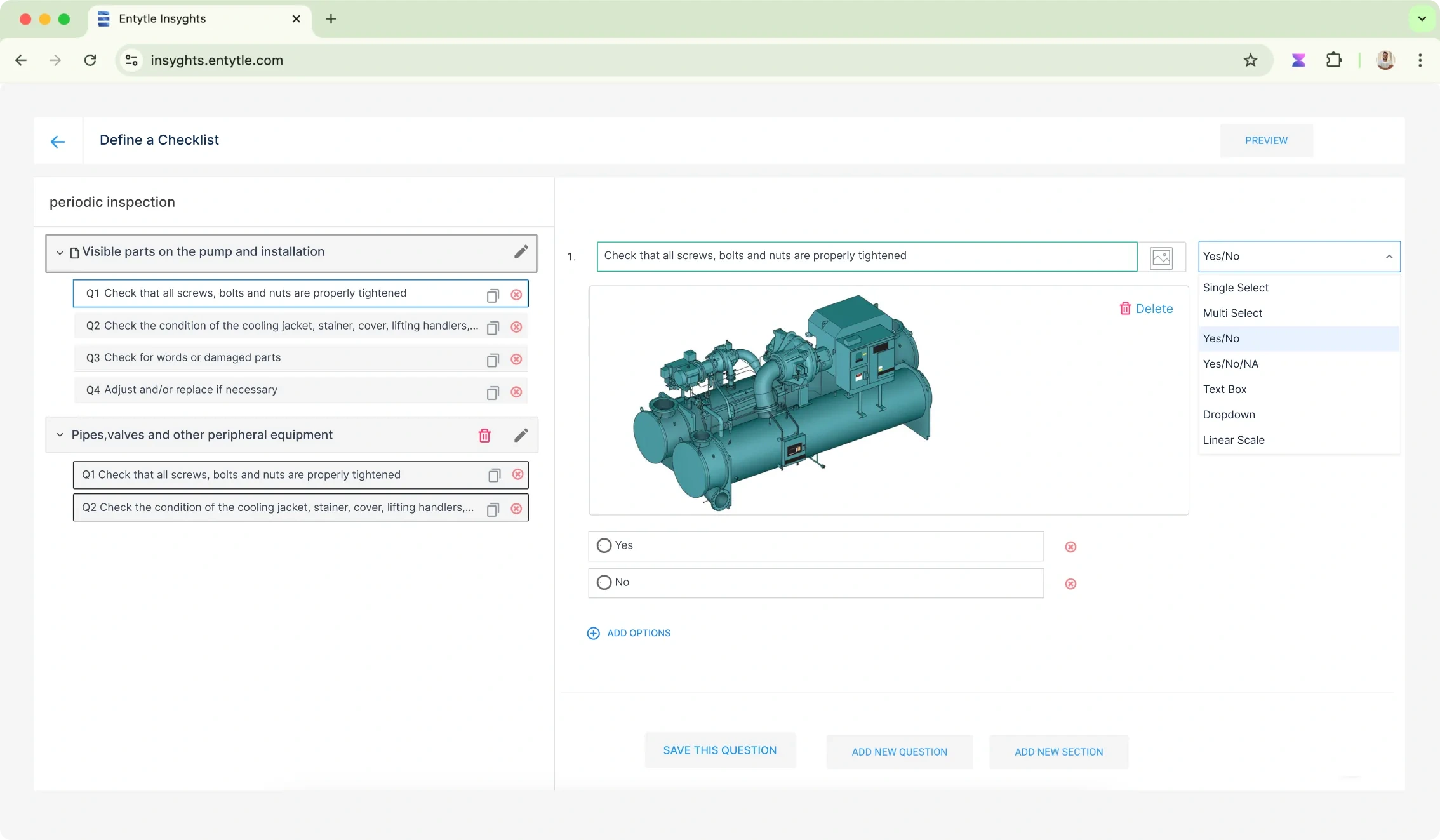
Health Check turns the manufacturer's inspection table into a checklist, like a quiz. It is scheduled against one serial, answered on a phone by the inspector standing at the machine, and reviewed on the same asset.

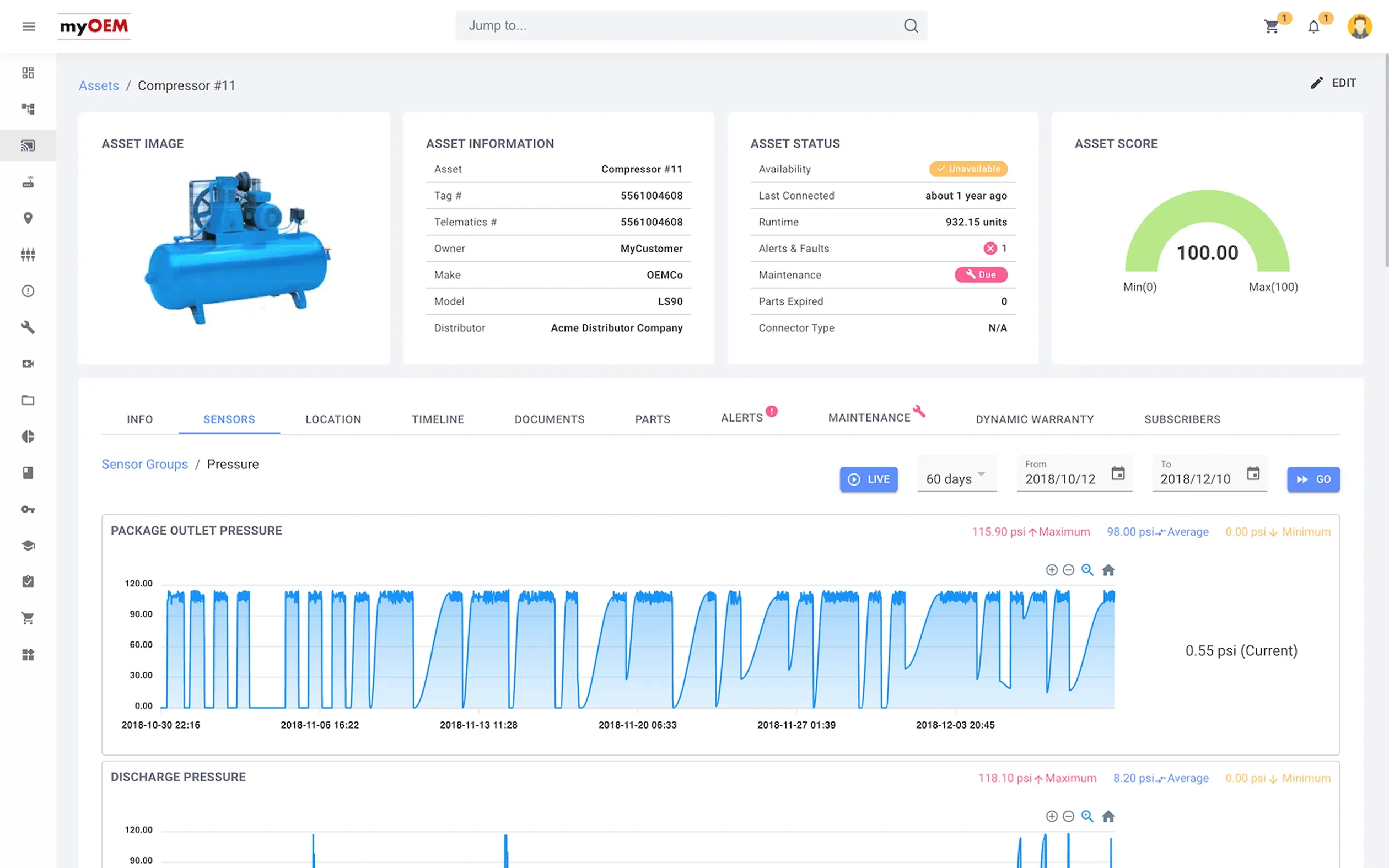
A competitor, myOEM, reads machines through live telemetry. Entytle reads them from ship date, service history and the manufacturer's intervals, so a machine does not need to be connected.

The Equipment tab of a customer location in Entytle Insyghts: a Life Cycle Stage donut counting 28 items across Overhaul, Periodic Inspection and Initial Inspection, a stacked bar chart of those stages per equipment model including a Competitor column, and a table of 28 results giving each item its age, the service recommended today, and what that service is worth
28 machines at one location: the stage each is at, the service due, and what it is worth.
One machine open in Entytle Insyghts, N90P SPECPRO serial SA110254-J, with a slider reading Display recommendations for the next from Today to 20 Years, summary cards for equipment age, recommended service today and its value, and a Service tab listing inspection titles with their numbered checks
One machine, and a slider from today to twenty years. Scrub it and the recommended service and its value move with it.
  • A checklist builder in Entytle Insyghts: a periodic inspection in the left rail broken into sections and numbered questions, and on the right one question being edited with a reference image of the equipment, an answer type dropdown open on Single Select, Multi Select, Yes/No, Yes/No/NA, Text Box, Dropdown and Linear Scale, and Yes and No options
    Written
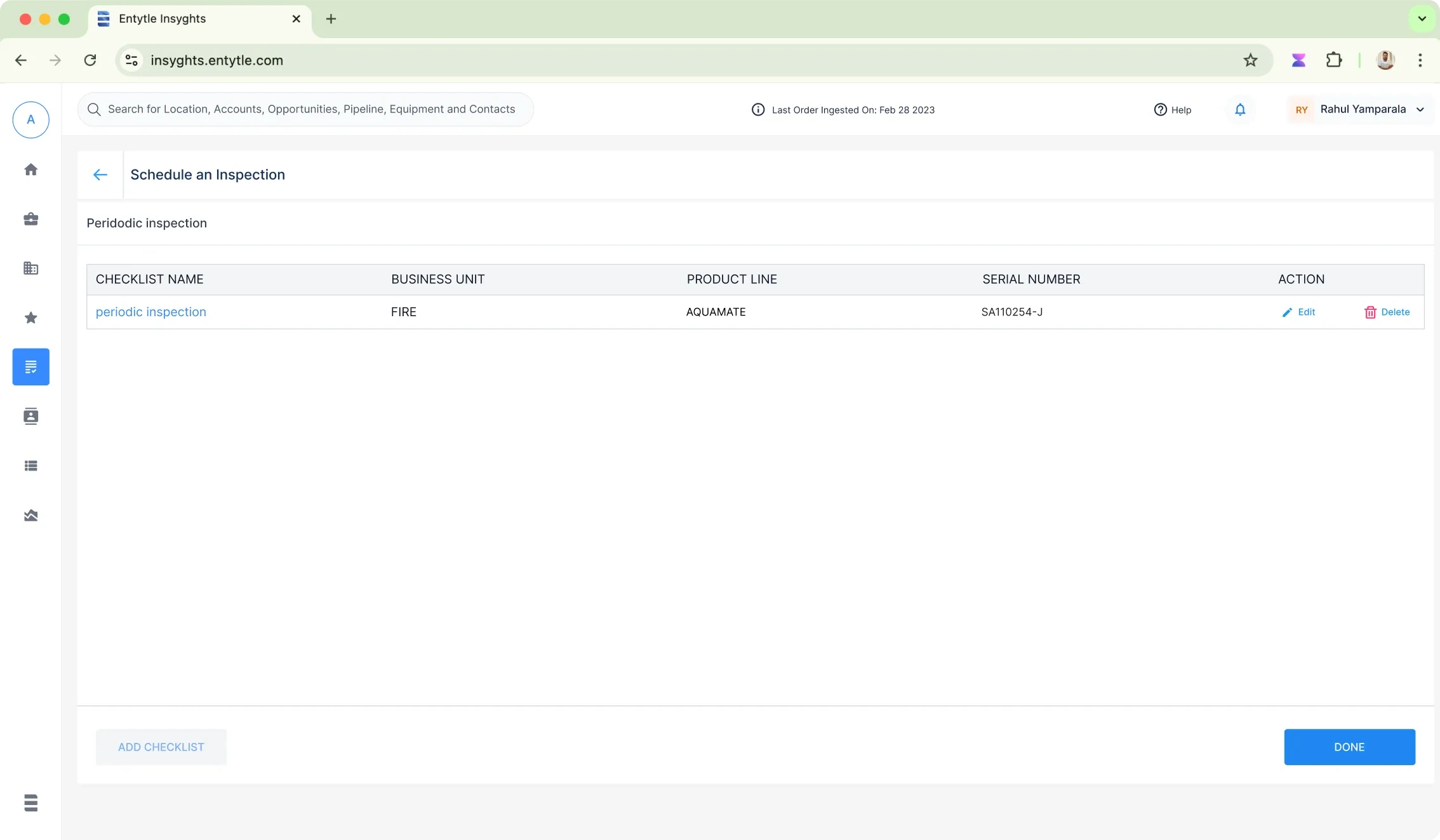
  • The Schedule an Inspection screen, listing a periodic inspection checklist against its business unit, product line and equipment serial number, with actions to edit or delete it and buttons to add another checklist or finish
    Scheduled to a serial
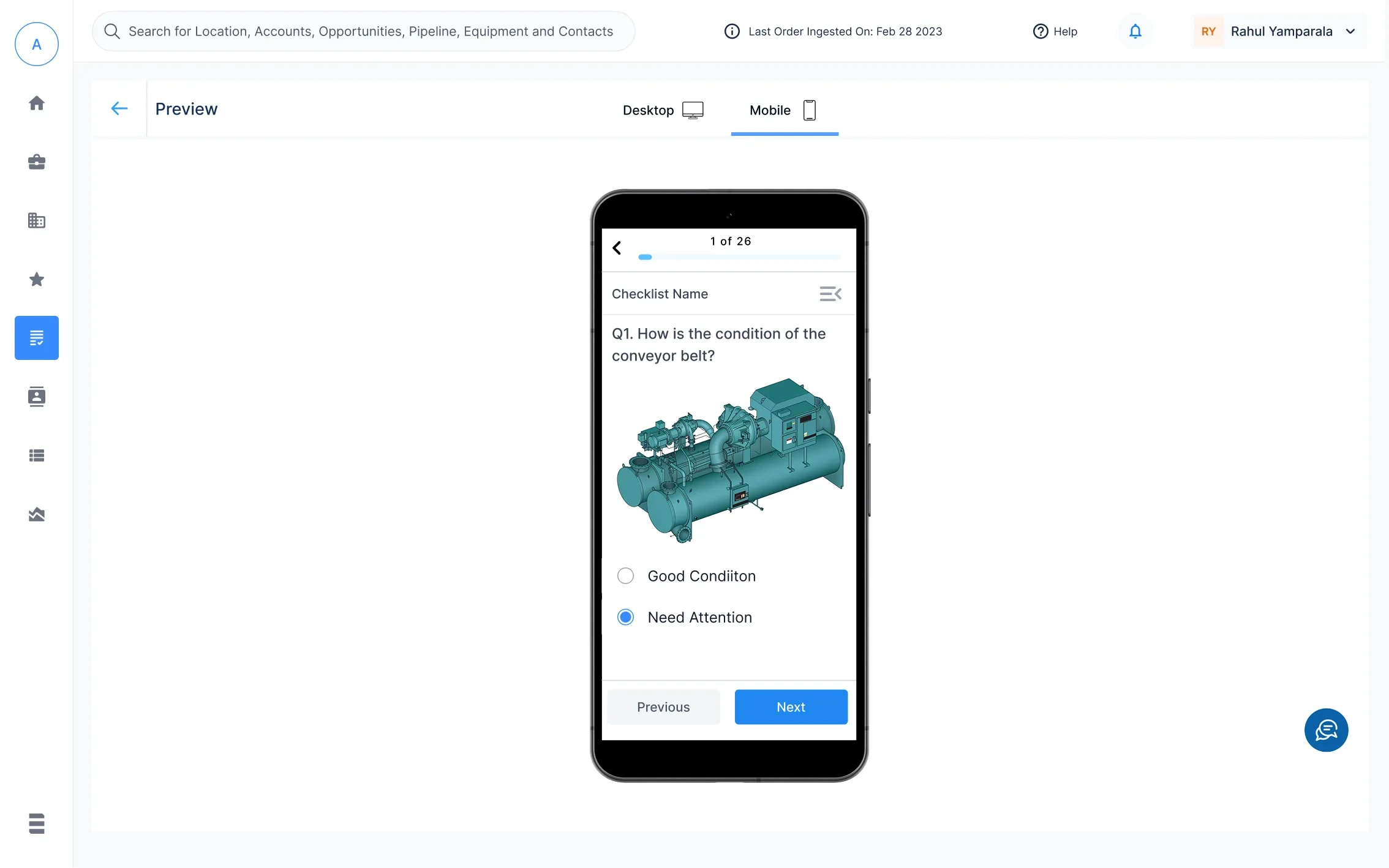
  • The checklist preview with a desktop and mobile toggle above it and mobile selected, showing question 1 of 26 on a phone: how is the condition of the conveyor belt, a reference image of the machine, and two options for good condition or needs attention
    Answered at the machine
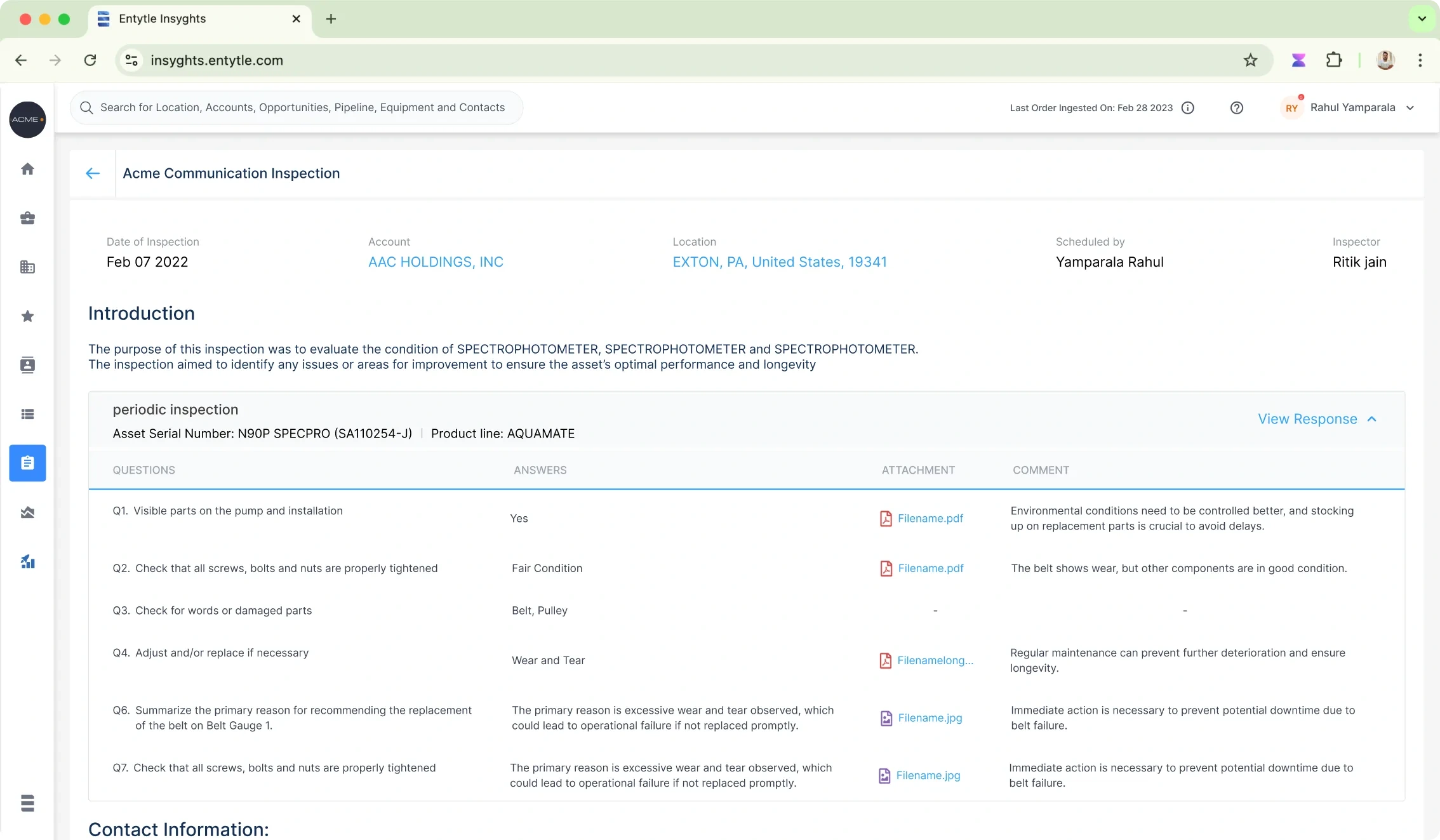
  • An inspection report in Entytle Insyghts showing date, account, location, who scheduled it and who inspected, an introduction paragraph, and a table of every question with its answer, an attached file, and the inspector's comment
    Reviewed
The Health Check loop: written once, scheduled against one machine, answered on a phone, and reviewed on the asset it was run on.
A competitor product, myOEM, showing its asset page for a compressor: asset image and information, an asset status panel with availability and last connected, an asset score gauge, and a sensors tab charting live package outlet and discharge pressure over a date range
myOEM, a competitor and not my work: telemetry first. Entytle's bet was that a machine should not need to be connected to be understood.

Inside a product already shipping

Installed Base Intelligence was Entytle's oldest product and already shipping when I joined, so I came to it a module at a time.

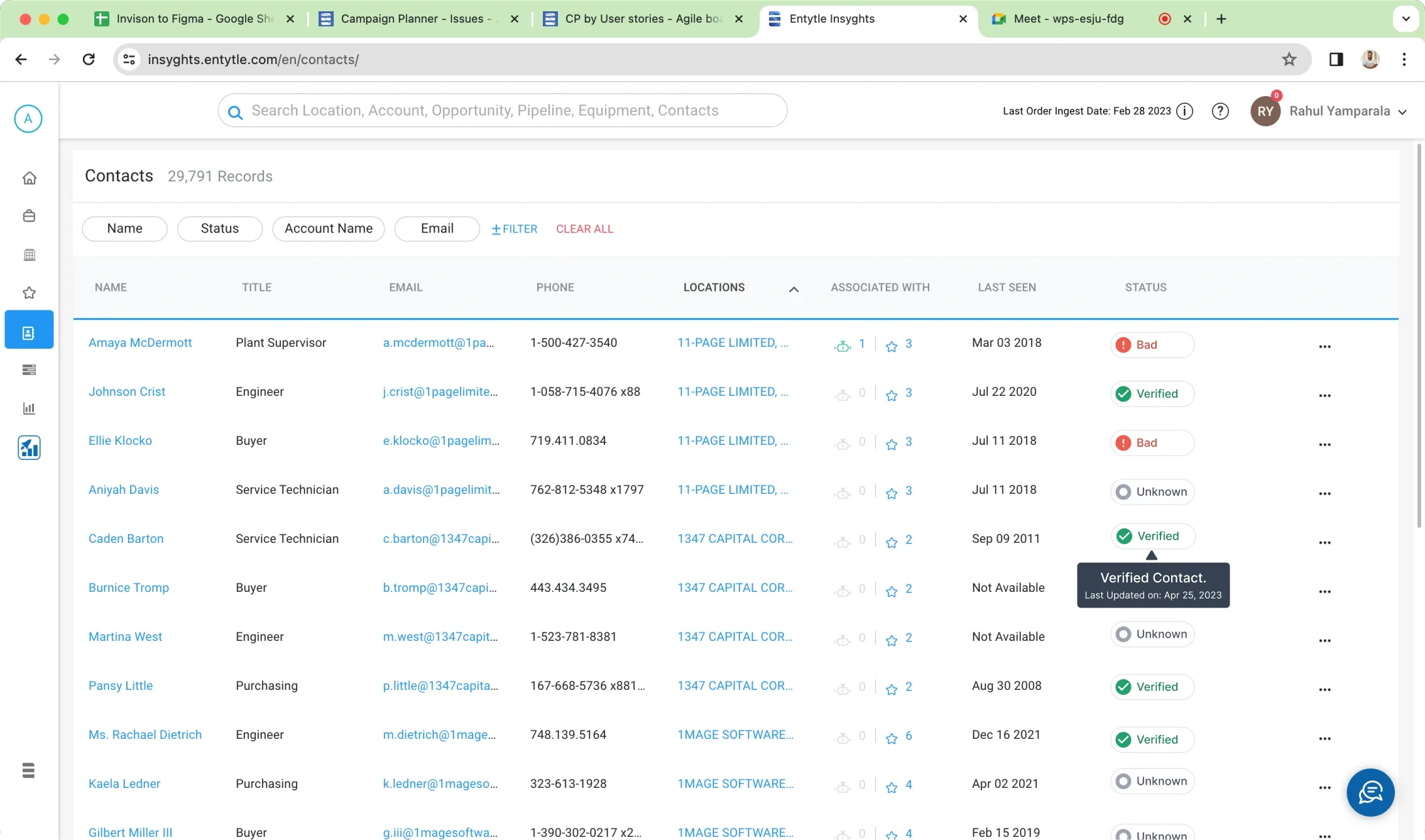
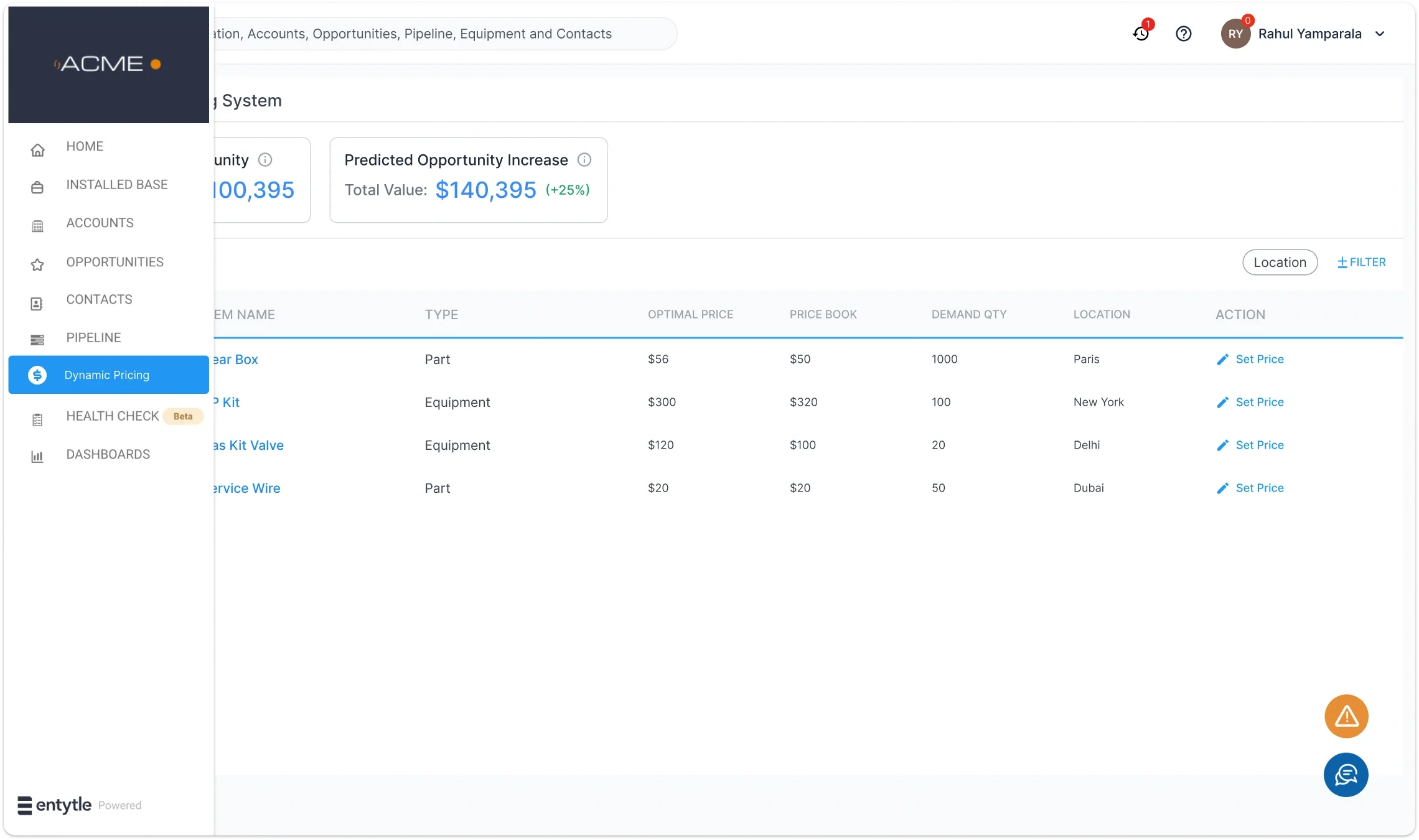
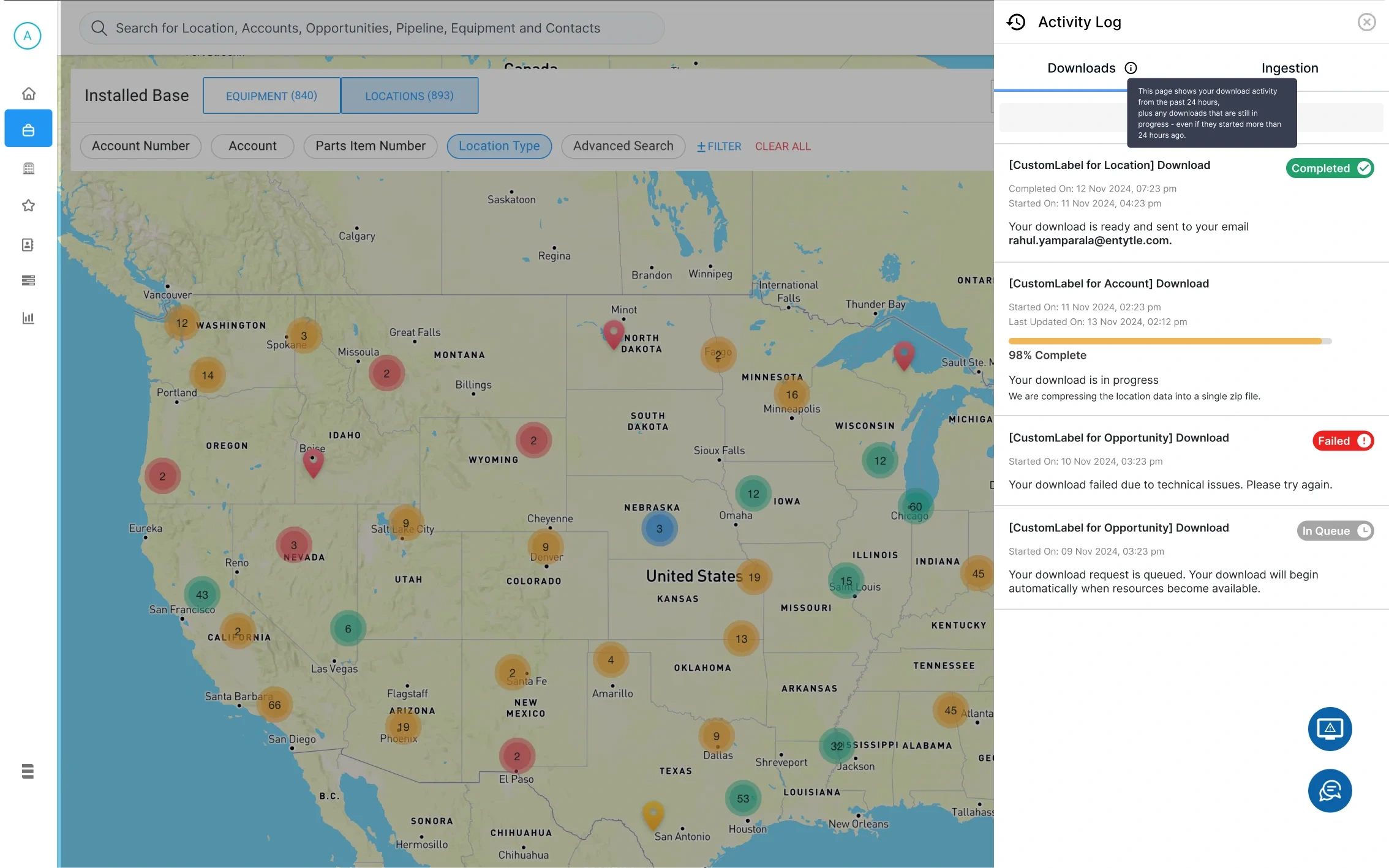
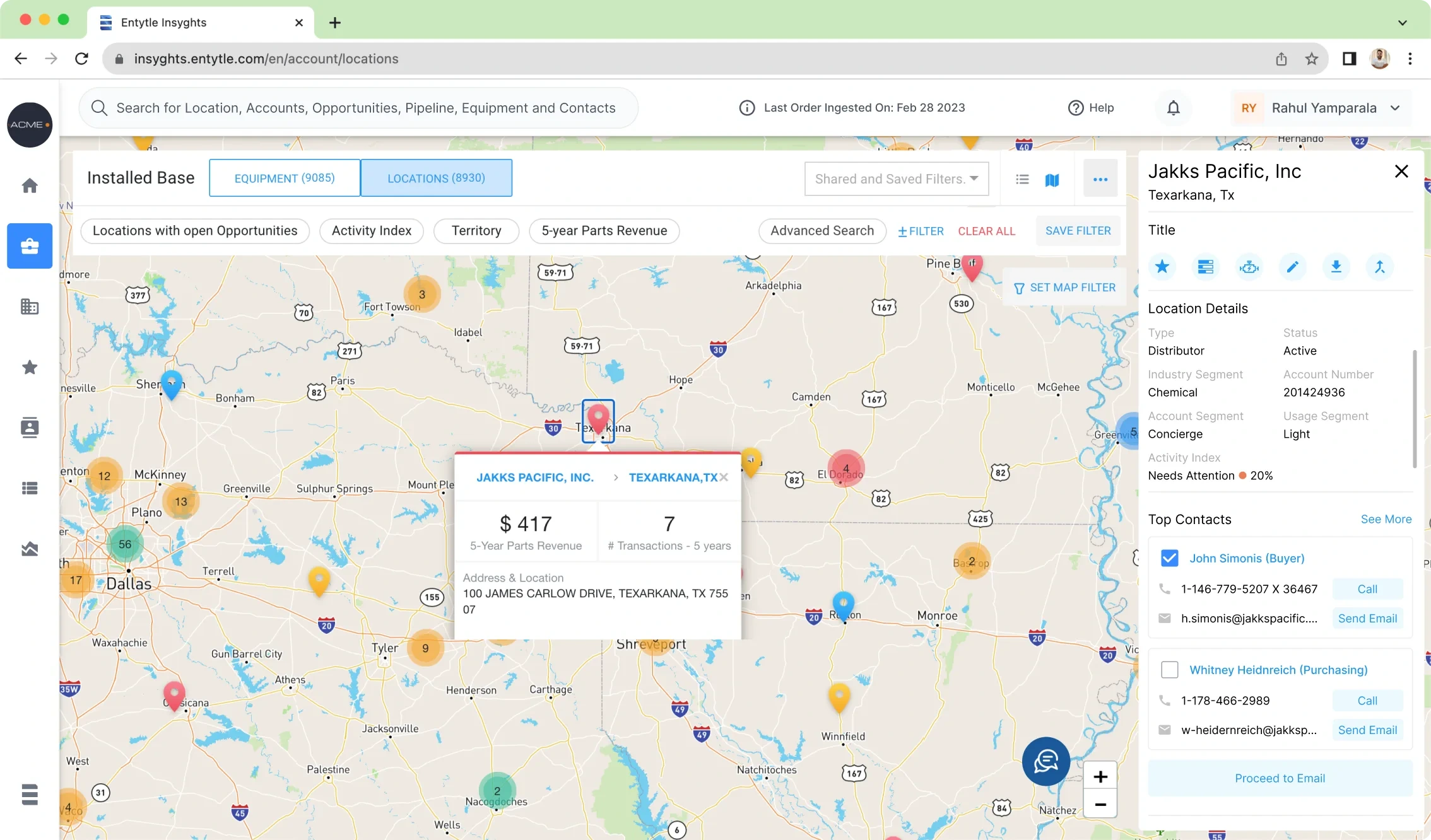
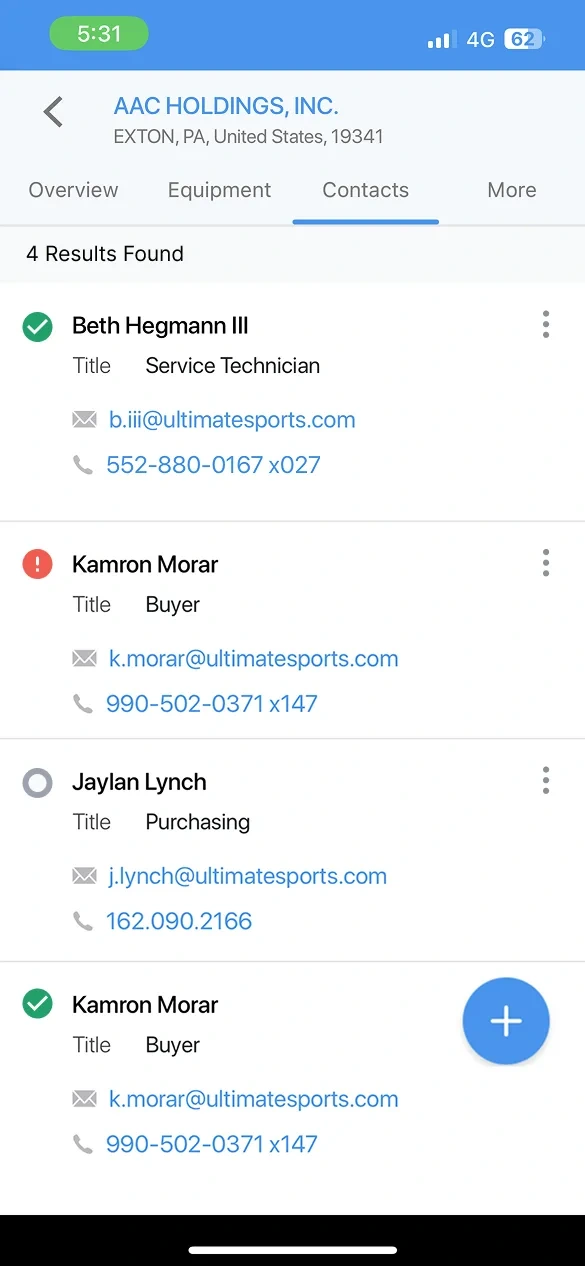
The account page puts one customer's installed base in one place, with the three numbers a rep opens with. Around it I designed four modules: contacts graded by how far to trust them, pricing that suggests rather than overrides, exports that say where they went, and email that starts from the machine, not the address book.
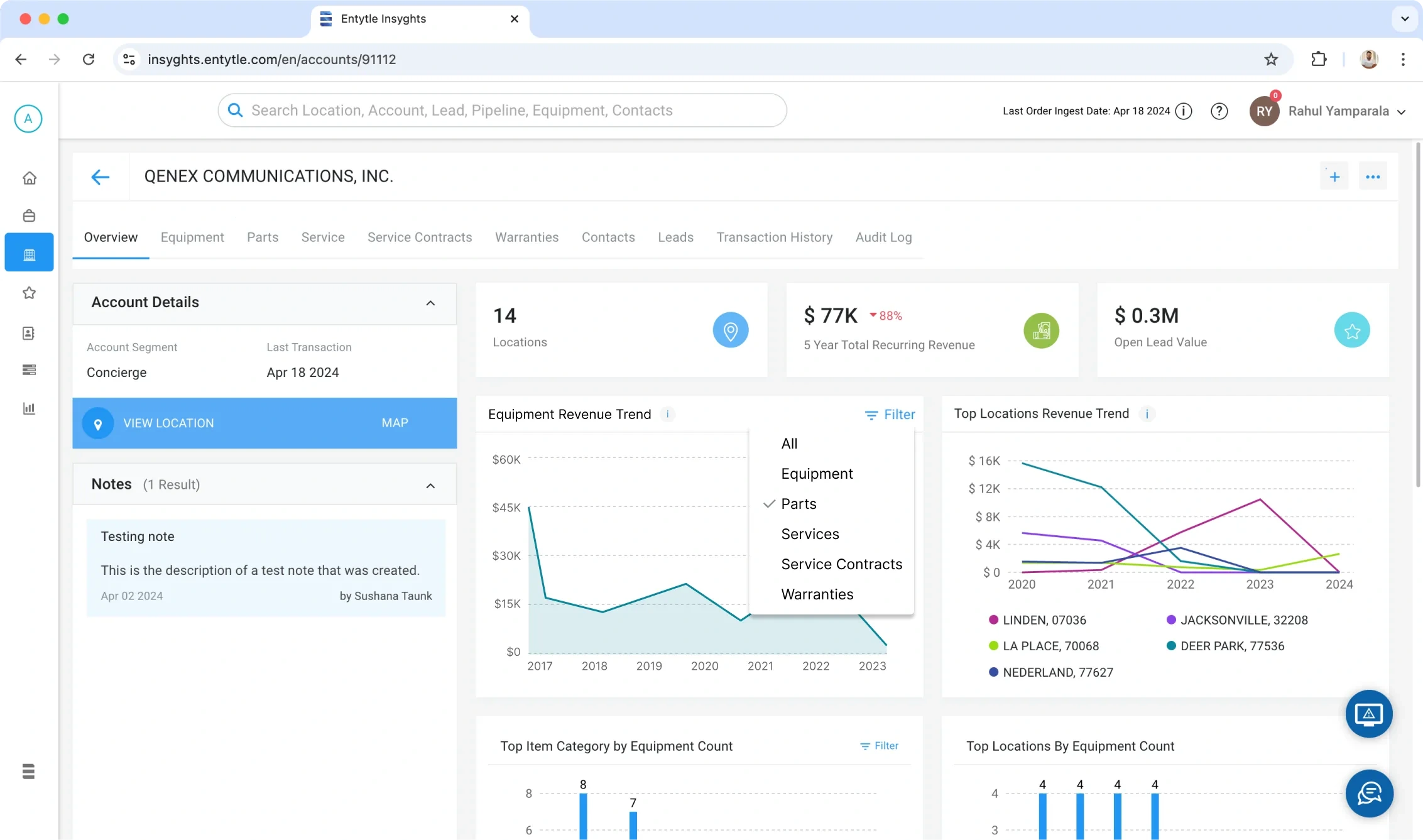
An account overview in Entytle Insyghts with tabs for overview, equipment, parts, service, service contracts, warranties, contacts, leads, transaction history and audit log, showing account segment and last transaction, cards for locations, five year recurring revenue and open lead value, and revenue and equipment count charts by category and location
One account: ten tabs of a customer's installed base, and the three numbers a rep opens with.
  • The Contacts module in Entytle Insyghts listing 29,791 records with filter chips for name, status, account name and email, and columns for title, email, phone, locations, associated with, last seen and a verified, bad or unknown status, with a tooltip reading Verified Contact and the date it was last updated
    Contacts, graded
  • The Dynamic Pricing System list, showing a predicted opportunity increase of 140,395 dollars at plus 25 percent, and a table of parts and equipment giving each one an optimal price against its price book value, demand quantity, location, and a Set Price action
    Pricing, suggested
  • The Activity Log panel with downloads and ingestion tabs, listing four jobs as completed, in progress at 98 percent with a note about compressing into a zip, failed with an invitation to retry, and queued with an explanation that it will start when resources free up, plus a tooltip explaining the log covers the past 24 hours
    Exports, explained
  • A location selected on the Installed Base map, with a side panel giving its type, segment and an activity index reading needs attention at 20 percent, then its top contacts each with a call and a send email action and a checkbox, above a proceed to email button
    Email from the machine
The four modules: a grade a person sets on each contact, a suggested price beside the price book, every state of a long export in words, and outreach that starts at the location that needs it.

What shipped, and what it did

Quote Agent, Asset Lifecycle Management, Health Check and the dashboard all shipped. Newton did not.

Retention rose 7 percent, with the UI revamp and a password experiment I ran. The experiment has its own case study.

What this page does not claim

  • The plant model is drawn for this case study, not an Entytle screen. Its machines, stages and values are illustrative.
  • No customer is named on this page.
  • Newton was in development and did not ship; its frame shows a design.
  • The 12 hours Quote Agent saved is the figure from my deck for it, not a controlled study. The minutes per quote are Entytle's published benchmark, not my measurement.
  • The 7 percent rise in retention came with the UI revamp and the password experiment together; this page does not separate the two.

Built remotely, with a team in Pune

Entytle's team was in Pune, and I worked with them remotely from 2022 to 2024. Drawn for this page: the gate of Shaniwar Wada.